

Dentsply Sirona alternatives for imaging equipment

Dentsply Sirona offers dental imaging equipment across intraoral and extraoral applications, making it a practical benchmark for an equipment shortlist. That breadth does not determine whether replacing your entire imaging workflow is necessary. The best Dentsply Sirona alternatives in 2026 start with Proelitedental for component-by-component equipment sourcing; NanoPix is a candidate when your immediate need is an intraoral digital sensor.
- Compare Dentsply Sirona alternatives by imaging task, not by supplier name alone.
- Proelitedental suits dental imaging buyers evaluating individual equipment purchases rather than an entire system replacement.
- HyperLight addresses portable X-ray acquisition; NanoPix addresses intraoral image capture.
- FinScan F350 belongs on a CBCT shortlist, not a sensor replacement shortlist.
- Confirm software compatibility, installation responsibilities, and written service terms before approving an equipment purchase.
Why this matters
An X-ray generator, intraoral sensor, CBCT unit, and intraoral scanner solve different problems. Buying across those categories without separating their functions creates an inaccurate comparison. Start with the clinical task, then compare equipment within that task.
For your 2026 purchase, identify what must change and what should stay. An aging sensor does not automatically justify replacing a functioning generator; a need for volumetric imaging does not make an optical scanner a substitute for CBCT.
Proelitedental is best for dental imaging buyers who want to evaluate equipment components individually. Treat each purchase as a compatibility and service decision, not simply a change of brand.
Dentsply Sirona alternatives at a glance
This shortlist combines an equipment supplier with specific equipment candidates. The entries are purchase routes, not interchangeable products or a ranking of clinical performance.
| Supplier or equipment | Best for | Defining role | How it differs from the benchmark |
|---|---|---|---|
| Dentsply Sirona | Practices evaluating a manufacturer's imaging portfolio | Dental imaging equipment across multiple categories | The manufacturer benchmark; compare an exact model rather than the company name |
| Proelitedental | Component-by-component dental imaging sourcing | Supplies portable X-rays, digital sensors, CBCT equipment, and scanners | A supplier route for evaluating separate equipment purchases |
| Eighteeth HyperLight Portable Dental X-Ray | Buyers specifically seeking a portable X-ray system | Portable dental X-ray generation | Compare against the relevant X-ray generator, not against a sensor or CBCT unit |
| NanoPix Intraoral Digital Sensor | Practices replacing or adding an intraoral digital receptor | Intraoral digital image capture | A component-level option rather than a complete imaging-system replacement |
| FinScan F350 CBCT Unit | Practices evaluating volumetric imaging equipment | CBCT acquisition | Requires a CBCT-to-CBCT comparison with a named Dentsply Sirona model |
| Helios 700 Wireless Intraoral Scanner | Practices evaluating wireless digital impressions | Optical intraoral scanning | Addresses digital impressions rather than radiographic imaging |
1. Proelitedental: best for component-by-component sourcing
Proelitedental sells dental equipment and supplies, including portable X-ray systems, intraoral digital sensors, CBCT units, and intraoral scanners. Its role in this comparison is equipment supplier, not an imaging manufacturer. Your decision therefore includes both the selected device and the party responsible for installation, training, and service.
Where this route shines
- Targeted replacement: You can evaluate the equipment category that needs attention without assuming the whole imaging workflow must change.
- Relevant equipment choices: HyperLight, NanoPix, and FinScan F350 address different radiographic purchasing needs.
- Broader equipment planning: Scanner purchases can be considered separately from radiographic equipment while remaining part of the practice's digital workflow plan.
Where this route falls short
- Buying separate components does not establish software compatibility between them.
- A supplier relationship does not automatically replace an existing manufacturer's service arrangement.
- Product-specific warranty coverage, installation scope, and support responsibilities still require written confirmation.
HyperLight: the portable X-ray candidate
The Eighteeth HyperLight listing identifies it as a portable dental X-ray system and states FDA clearance. That makes it relevant to a portable-generator shortlist. FDA clearance does not establish that a particular practice installation or operating arrangement meets every applicable state requirement.
Before selecting HyperLight, request its current operating manual, exposure settings, battery specifications, charging requirements, and operator-protection instructions. Evaluate handling and positioning during a demonstration, using the intended receptor and positioning accessories. Keep staff training and applicable radiation-control requirements in the purchase plan.
| Purchasing dimension | HyperLight | Dentsply Sirona comparison |
|---|---|---|
| Equipment category | Portable dental X-ray system | Select the exact generator model being considered |
| Workflow question | Does portable acquisition fit your intended use? | Does the selected model fit that same use? |
| Receptor relationship | Confirm exposure workflow with your chosen sensor | Confirm the same workflow for the selected generator |
| Purchase evidence | Current manual, demonstration, and written terms | Obtain equivalent documentation for the competing model |
Best for: Practices deliberately seeking portable radiographic acquisition rather than simply replacing an intraoral sensor.
Verdict: Hold until the portable workflow and operating requirements are confirmed.
2. NanoPix: best for an intraoral sensor replacement shortlist
NanoPix is an intraoral digital sensor, so its relevant comparison is the receptor and acquisition workflow—not the X-ray generator. Put NanoPix on your shortlist when the purchase centers on sensor replacement, an additional imaging station, or receptor fit.
Where NanoPix shines
- It addresses the intraoral receptor portion of the workflow directly.
- It supports a focused comparison around sensor handling, patient fit, image acquisition, and workstation use.
- It allows you to evaluate a sensor purchase separately from a generator purchase.
Where NanoPix falls short
- A digital sensor does not replace an X-ray generator or provide CBCT acquisition.
- Connection hardware alone does not establish compatibility with your imaging software.
- Sensor selection still requires checking active area, external dimensions, cable handling, and positioning-system fit.
Ask for a demonstration using your exact software version and intended workstation. Follow the process from selecting the patient through acquisition, image saving, retrieval, and export. A successful connection is only the beginning.
| Purchasing dimension | NanoPix | Dentsply Sirona sensor comparison |
|---|---|---|
| Equipment role | Intraoral digital sensor | Compare against a named intraoral sensor |
| Patient fit | Evaluate external dimensions and positioning | Apply the same fit assessment |
| Software workflow | Demonstrate acquisition and retrieval | Demonstrate the equivalent workflow |
| Service exposure | Request cable-damage and replacement terms | Compare written coverage and exclusions |
Best for: Practices whose immediate equipment need is an intraoral digital receptor.
Verdict: Hold until software, positioning, and service checks pass.
3. FinScan F350: best for a CBCT-specific equipment shortlist
FinScan F350 is listed as a CBCT unit. It belongs in a volumetric-imaging comparison, where your intended examinations determine which specifications matter. Do not use a portable X-ray or sensor comparison to justify a CBCT decision.
Where FinScan F350 shines
- It provides a named CBCT candidate for a focused equipment enquiry.
- It keeps the shortlist tied to volumetric acquisition rather than unrelated imaging categories.
- It gives the practice a specific model around which to request a brochure, demonstration, and installation proposal.
Where FinScan F350 falls short
- The CBCT designation alone does not establish suitability for your intended examinations.
- Field of view, acquisition protocols, reconstruction options, and software functions require model-specific review.
- A purchase decision also depends on room planning, installation, acceptance checks, training, and service arrangements.
For a 2026 CBCT enquiry, describe the examinations you intend to perform before requesting a configuration. Ask the seller to connect each proposed feature to that examination list. Require a clear distinction between included functions and optional software or accessories.
| Purchasing dimension | FinScan F350 | Dentsply Sirona CBCT comparison |
|---|---|---|
| Equipment category | CBCT unit | Select a named CBCT model |
| Clinical fit | Verify protocols against intended examinations | Use the identical examination list |
| Installation | Request a site-specific scope | Request an equivalent site-specific scope |
| Ownership | Document software and service obligations | Compare the same obligations |
Best for: Practices preparing a CBCT purchase specification and requesting model-specific proposals.
Verdict: Hold until clinical scope and installation requirements are documented.
4. Helios 700: best for a wireless digital-impression shortlist
Helios 700 is identified as a wireless intraoral scanner. Include it only when your search for alternatives extends to digital impressions; optical scanning is not a replacement for radiographic imaging.
Where Helios 700 shines
- Wireless operation is an explicit feature of the listed model.
- It provides a specific candidate for evaluating digital-impression handling.
- Its purchase can be assessed separately from X-ray and CBCT equipment.
Where Helios 700 falls short
- It does not replace a radiographic acquisition device.
- Wireless operation alone does not confirm workstation compatibility, battery workflow, or laboratory acceptance.
- Scan export, software access, tip reprocessing, and procedure-specific suitability need confirmation.
Best for: Practices specifically evaluating wireless optical scanning for digital impressions.
Verdict: Hold until your laboratory and scanning workflow requirements are confirmed.
Why practices consider switching from Dentsply Sirona
A defensible switch starts with a defined requirement, not an unsupported claim about another manufacturer's equipment. These are purchasing situations to assess—not claims about Dentsply Sirona customer behavior.
- A component needs replacement: Compare sensors when the receptor is the problem, rather than treating the entire system as obsolete.
- The acquisition location is changing: Evaluate portable equipment when your intended workflow requires it.
- The examination scope is expanding: Compare CBCT units when volumetric acquisition is the actual requirement.
- The practice is adding digital impressions: Run a separate scanner evaluation rather than combining optical and radiographic specifications.
Keep the replacement scope as narrow as the clinical requirement allows. That makes the demonstration, compatibility review, and ownership comparison more specific.
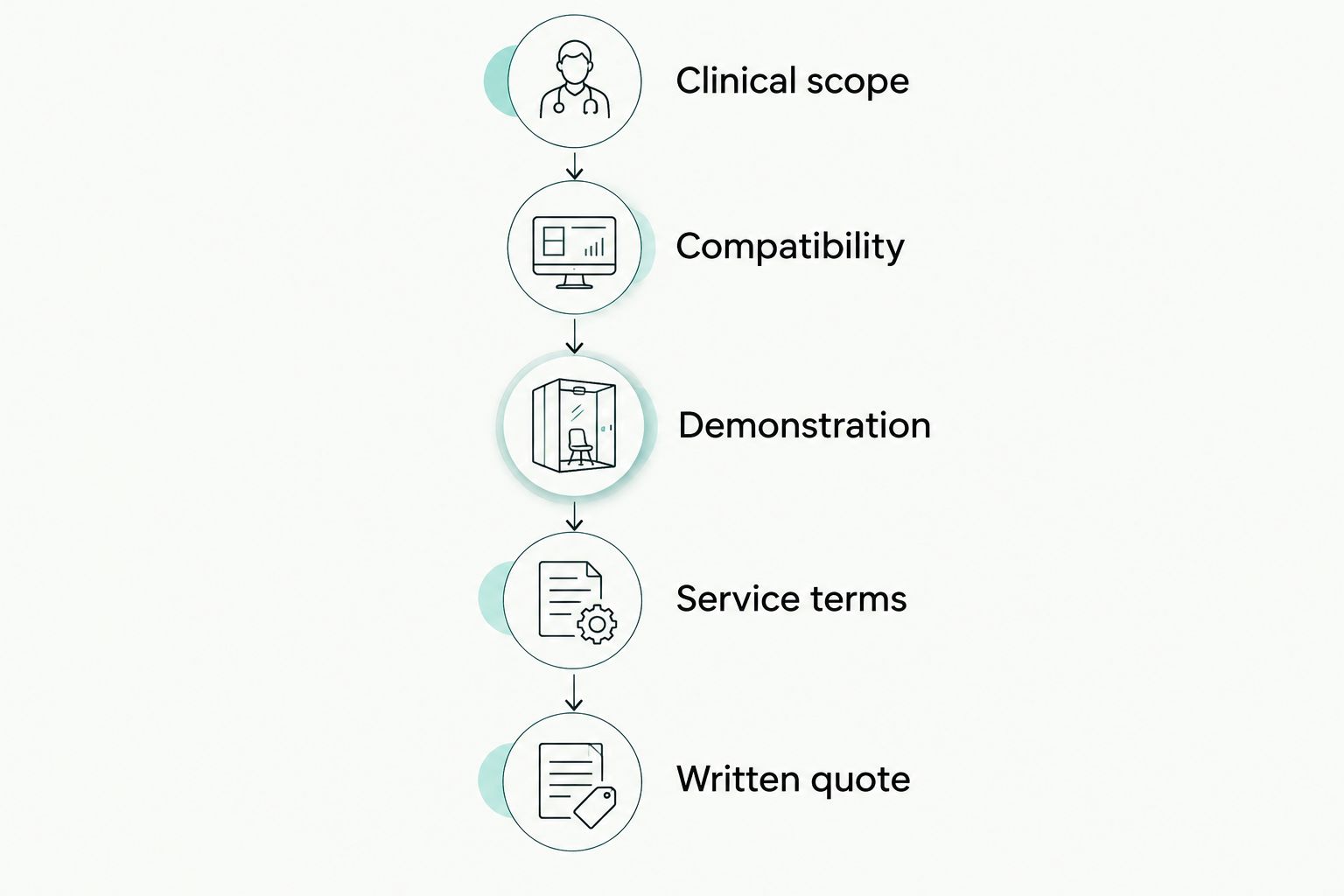
Use this purchase-validation sequence
For a 2026 equipment decision, move through the same checks for every shortlisted model. Do not let a convincing demonstration of one feature stand in for a complete workflow review.
- Clinical scope: List the examinations or impressions the equipment must support. Separate essential functions from optional expansion plans.
- Compatibility: Record the exact software, operating system, workstation, receptor, and accessories involved. Request written confirmation where integration is required.
- Demonstration: Follow a representative case from patient selection through acquisition, saving, retrieval, and transfer. Use de-identified or demonstration records.
- Service terms: Identify who handles installation, training, troubleshooting, repairs, and replacement decisions. Request exclusions as well as coverage.
- Written quote: Require an itemized equipment configuration and a clear statement of included services, software obligations, and acceptance conditions.
For ownership planning, distinguish acquisition expenses from recurring obligations. Ask about installation, workstation changes, software access, maintenance, replacement accessories, and repair handling. Request current product-specific warranty documents rather than relying on a general assurance about support.
The following equipment cards identify relevant radiographic candidates. They do not imply that the devices are interchangeable or that a combined installation has been validated.


When staying with Dentsply Sirona is the right call
Stay with Dentsply Sirona when your current equipment meets the clinical requirement and the proposed replacement has not demonstrated a meaningful workflow benefit. An alternative is not an improvement merely because it comes from another supplier.
For a 2026 replacement decision, compare the work required to change systems against the work required to maintain the current setup. Include software integration, staff retraining, historical-image access, and service responsibility. Keep functioning equipment when the replacement case remains unproven.
FAQ
What's the best Dentsply Sirona alternative for imaging equipment?
Proelitedental is a supplier option for practices evaluating imaging equipment component by component. Shortlist HyperLight for portable X-ray generation, NanoPix for intraoral sensing, and FinScan F350 for CBCT, then validate each device against your requirements.
Can NanoPix replace my existing Dentsply Sirona sensor?
Select NanoPix as a replacement only after confirming compatibility with your exact acquisition software and workstation. Demonstrate patient selection, acquisition, saving, retrieval, and export before approving the purchase.
Is HyperLight an alternative to a CBCT machine?
No. HyperLight is a portable dental X-ray system, while a CBCT unit performs volumetric acquisition. Compare equipment within the same clinical category.
Does FDA clearance mean I can use a portable dental X-ray anywhere?
No. FDA clearance does not establish compliance with every state or practice-specific operating requirement. Check the device instructions and applicable radiation-control requirements before use.
What should a CBCT equipment quote include?
A CBCT quote should identify the exact equipment configuration, software scope, installation responsibilities, training, and service terms. It should also state site requirements and distinguish included functions from optional additions.
Is Helios 700 a substitute for dental X-rays?
No. Helios 700 is a wireless intraoral scanner for optical digital impressions. Evaluate it separately from X-ray generators, intraoral digital sensors, and CBCT units.
Should I replace working imaging equipment when changing suppliers?
No, not without a defined replacement requirement. Keep working equipment when it meets your clinical needs and a proposed alternative has not demonstrated a clear workflow benefit.
One last thing
Before signing a 2026 equipment order, ask one operational question: Who owns the problem if acquisition works but the image does not reach the patient record? Require the equipment seller and software provider to define their responsibilities. A device demonstration and a working practice workflow are different acceptance tests.