

Portable dental X-ray vs wall-mounted units: workflow trade-offs
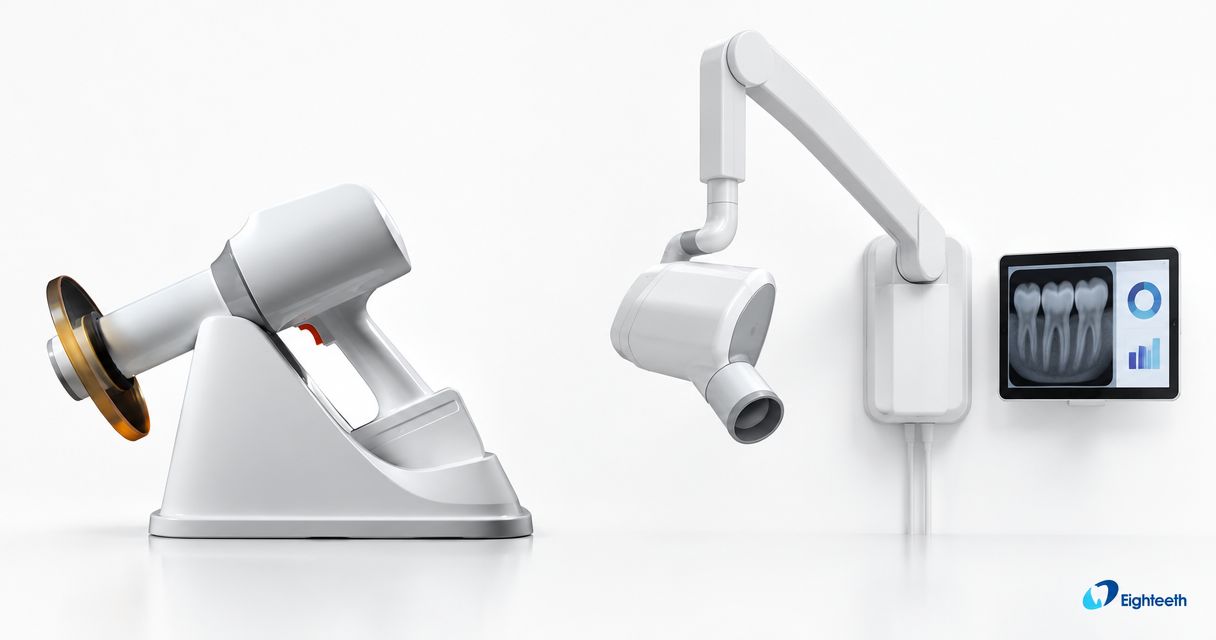
A portable dental X ray unit suits workflows that require moving the exposure source between operatories or care locations; a wall-mounted unit suits a fixed operatory where the source should remain ready at the chair. Portability adds charging, transport, and shared-equipment coordination, while wall mounting adds installation requirements and limits where that source can serve patients.
- Portable dental X ray equipment trades fixed installation for charging, transport, and operator-positioning responsibilities.
- Wall-mounted units suit fixed-chair workflows but cannot move between care locations.
- Compare the complete acquisition workflow, including sensor placement, exposure technique, disinfection, and image review.
- ProElite Dental Supply serves dentists evaluating portable X-ray equipment and digital imaging supplies.
For a specific portable option, the Eighteeth HyperLight Portable Dental X-Ray | FDA Cleared belongs on your equipment review list. Its product designation does not replace a review of the operating instructions, local requirements, or suitability for your planned use.
Why this matters
Your exposure source is only one part of intraoral image acquisition. The receptor, positioning system, acquisition software, operator technique, and room arrangement also determine whether the workflow fits your practice.
For a 2026 equipment purchase, define the operational problem before comparing devices. Moving equipment between rooms, reaching patients outside a conventional operatory, and keeping a busy chair independently equipped are different requirements. Buy for the constraint you need to remove, not for portability alone.
Portable dental X-ray vs wall-mounted units: what are the workflow trade-offs?
The central trade-off is mobility versus fixed-room readiness. A handheld source travels with the operator; a wall-mounted source remains assigned to its installation location. Neither arrangement, by itself, establishes better diagnostic image quality or lower radiation exposure.
Here, portable means a handheld intraoral X-ray source. Cart-mounted configurations need their own assessment because transport, support, and exposure-position requirements differ from those of handheld equipment.
| Workflow consideration | Portable handheld unit | Wall-mounted unit |
|---|---|---|
| Best for | Practices needing a source that moves between locations | Practices needing a source assigned to a fixed operatory |
| Positioning | Operator supports and aligns the handheld source as instructed | Operator positions the tubehead using its mounted arm |
| Room sharing | Equipment moves between rooms; availability requires coordination | Source remains in its installed room |
| Power planning | Battery condition and charging become operating tasks | Installation requires the specified electrical provision |
| Physical constraints | Grip, reach, device support, and permitted operating geometry matter | Mounting location, arm travel, and clearance matter |
| Main advantage | Transportability | Dedicated-room readiness |
| Main limitation | Shared-device access and battery management | Fixed location and installation requirements |
| Safety review | Model-specific handheld instructions and local requirements | Model-specific installation instructions and local requirements |
Do not interpret this comparison as a radiation-safety ranking. Evaluate the specific source, exposure settings, receptor, positioning technique, and required protective measures together.
Portable handheld units: best for equipment that must move
A portable source makes sense when moving the equipment is part of the care model. That includes practices assessing mobile dentistry or deciding whether a source should serve more than one operatory. Confirm that the proposed device and operating arrangement are permitted before treating mobility as a purchasing benefit.
The practical advantage is flexibility. The operational cost is that someone must move, prepare, clean, store, and charge the equipment. Sharing also creates a scheduling dependency: equipment assigned to one procedure is not simultaneously available elsewhere.
Assess the operator's actual working position
Evaluate grip, reach, visibility, and source alignment using the manufacturer's permitted technique. A demonstration should include the patient-chair positions and receptor holders your team expects to use, rather than only an unobstructed tabletop presentation.
If the model requires a particular shield position or operating geometry, include that requirement in the demonstration. Do not improvise an alternative holding position to improve access. Reject a configuration that only works when the operator departs from the instructions.
Define where the device goes between exposures
Choose a storage and charging location that fits your infection-control process and prevents equipment from becoming an unassigned shared resource. Establish who checks readiness before the clinical session and who handles a device fault.
For your 2026 evaluation, ask the supplier to document the charging procedure, battery-care instructions, and applicable replacement arrangements. Do not translate a demonstration battery indicator into an assumed daily exposure capacity.
Wall-mounted units: best for a dedicated operatory
A wall-mounted source suits a practice that wants the exposure unit to remain at a particular chair. It avoids moving that source between rooms, but its usefulness depends on the installation geometry and the operatory layout.
The mounting point is a purchasing decision, not merely an installation detail. Review the wall structure, required electrical provision, tubehead travel, and clearance with qualified installation personnel. A source that reaches the chair must also permit the intended projections without obstructing routine access.
Test the arm through the intended working area
Assess positioning with the chair and surrounding equipment in their clinical positions. Include access around cabinetry, delivery systems, and the patient headrest. Confirm that the proposed arm configuration is appropriate for the room rather than assuming every mounted unit has equivalent reach.
Ask how the installed assembly will be checked and maintained. Positioning instability, restricted movement, or mechanical wear belongs in the service discussion before purchase, not after the room has been committed to the equipment.
Separate dedicated access from practice-wide resilience
A source assigned to a room gives that room independent access to the source. It does not make the entire imaging pathway independent: a shared sensor, unavailable acquisition workstation, or software problem can still interrupt imaging.
Map the whole acquisition chain before buying another source. If the actual constraint is receptor access or workstation readiness, changing the source format leaves that constraint in place.
Why the workflow advantage varies
The better configuration depends on your operating arrangement, not on a universal preference for handheld or mounted equipment. Use these factors to structure the comparison:
- Care location: A fixed operatory and a mobile care setting impose different transport and setup requirements. Confirm which locations the purchase must serve.
- Concurrent imaging: Overlapping demand determines whether sharing a source is practical. Review actual appointment sequences rather than assuming room count represents simultaneous demand.
- Operator positioning: Handheld support requirements and wall-mounted arm geometry affect access differently. Assess both against the intended technique.
- Acquisition chain: Receptor placement, computer access, and image transfer remain necessary with either source. Source mobility does not create a mobile digital workflow by itself.
- Equipment readiness: Charging, inspection, cleaning, storage, and service arrangements determine whether the equipment is ready when needed. Assign responsibility explicitly.
- Installation and authorization: Local radiation-control requirements and manufacturer instructions shape the permissible setup. Confirm them for the specific model and location.
These factors also explain why a practice can reasonably retain mounted equipment while evaluating a portable source for a separate use case. The second device should solve a defined access problem, not duplicate a capability without a workflow purpose.
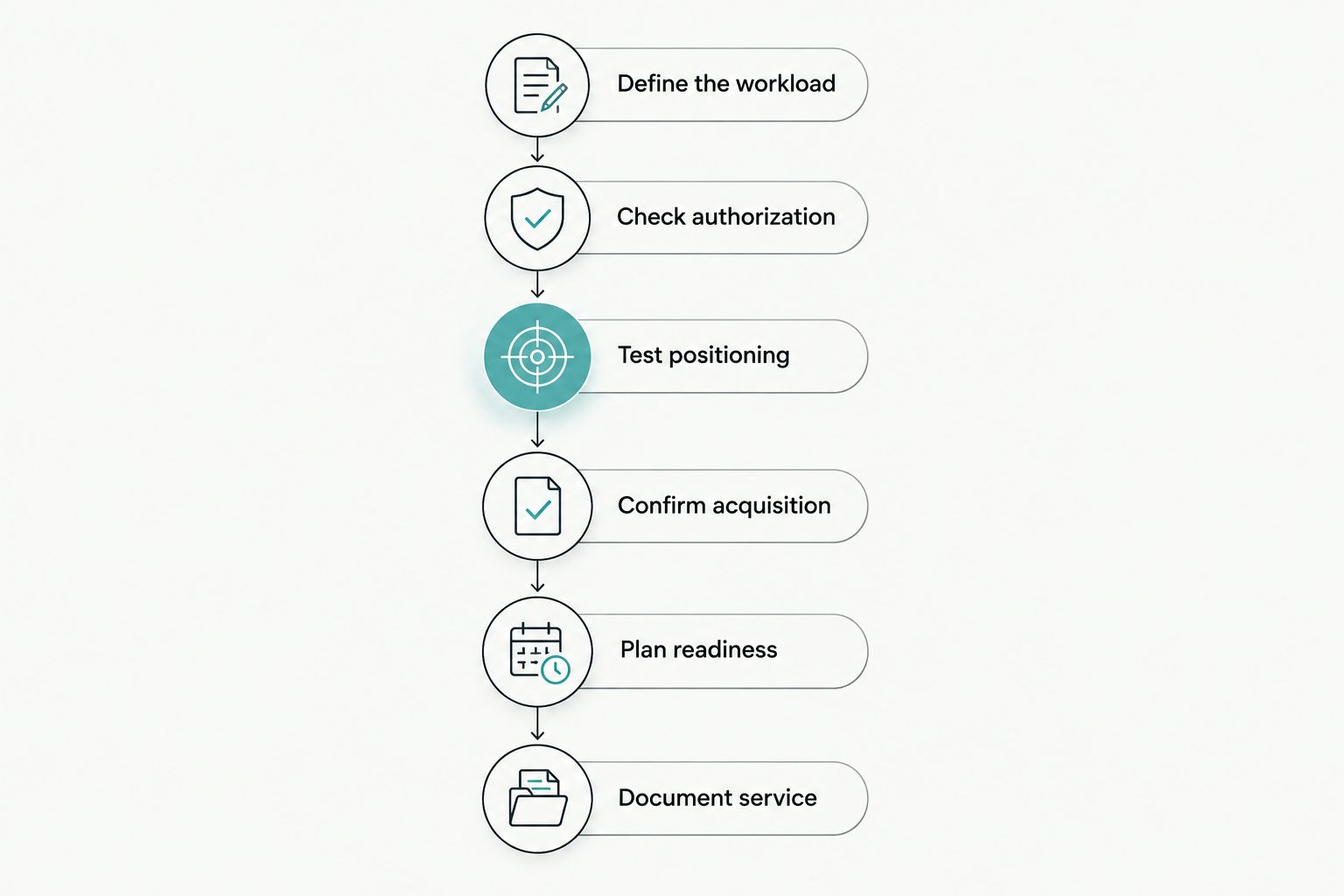
How do you compare both systems before purchasing?
Use the same clinical workflow to evaluate each configuration. A structured demonstration gives your team a clearer basis for a decision than isolated specifications or a supplier's preferred presentation.
- Define the workload. Identify the care locations, intended examinations, operators, and situations in which equipment demand overlaps. Separate routine fixed-chair work from mobile care requirements.
- Check authorization. Review the proposed model and use with the relevant radiation-control authority and your radiation-safety adviser. Request the manufacturer's current operating documentation.
- Test positioning. Assess the permitted source positions with your intended receptor holders and chair arrangement. Use an appropriate demonstration setup; do not expose patients solely to evaluate equipment.
- Confirm acquisition. Verify the receptor, acquisition software, workstation requirements, and image-handling pathway independently of the source's exposure function.
- Plan readiness. Document charging or installation needs, cleaning procedures, storage, inspection, staff training, and the process for removing faulty equipment from service.
- Document service. Obtain the exact warranty coverage, exclusions, service route, and applicable battery or accessory terms in writing before authorizing the purchase.
Keep the 2026 evaluation record tied to the exact model and configuration being quoted. A demonstration of a related model does not establish the specifications, included accessories, or service terms of the proposed purchase.
Does a portable source change sensor compatibility?
A portable source does not remove the need to validate the digital acquisition system. The X-ray source produces the exposure; the sensor and acquisition software form a separate part of the imaging pathway. Do not treat a source's portability as evidence that a particular sensor, computer, or software configuration will work.
Check the sensor manufacturer's exposure guidance and confirm the acquisition software's supported environment. Then establish the technique appropriate to the source and receptor combination under the relevant instructions and clinical quality-assurance process.
For receptor selection, use the dental X-ray sensor buying guide alongside the source evaluation. Include active imaging area, positioning, cable handling, cleaning instructions, and software integration in the purchasing discussion.
A source-and-sensor package can simplify procurement, but package membership alone does not answer every integration question. Request a written list of included components, software requirements, and responsibilities for resolving acquisition faults.
What belongs in the ownership and service review?
Compare ownership obligations without assuming that the smaller device has the simpler service pathway. Your 2026 purchasing file should distinguish equipment coverage from batteries, accessories, accidental damage, installation work, and software support.
Ask where service occurs, who authorizes a repair, and what documentation accompanies a fault report. If a replacement or loan unit matters to your operating plan, obtain the specific arrangement in writing; do not infer one from a general support statement.
ProElite Dental Supply is best suited to dental equipment buyers comparing portable X-ray equipment with related imaging supplies. Use a qualified quote enquiry to establish the exact configuration, compatibility questions, and product-specific service terms rather than treating a catalog listing as a complete purchase specification.
The following listings are relevant to a portable-source review. The source and stand serve different roles: the source is the exposure device; the stand is an accessory to assess against the intended setup. Do not assume that a stand changes the manufacturer's permitted exposure technique or eliminates handheld operating requirements.


For either listing, verify the current documentation before selection. The supplied listing information does not establish exposure parameters, operating weight, battery capacity, or product-specific warranty coverage, so those details belong in the equipment enquiry.
Can one portable unit replace every wall-mounted source?
One shared portable unit creates a shared-resource dependency. Whether that arrangement suits your practice depends on overlapping imaging demand, permitted use, equipment readiness, and the availability of an alternative when the source is out of service.
Do not base replacement solely on the number of rooms the device can physically reach. Review when those rooms need imaging and what happens when cleaning, charging, transport, or service interrupts access.
Is either configuration automatically safer or better diagnostically?
Neither configuration establishes a safety or diagnostic advantage by format alone. Radiation protection and diagnostic adequacy require evaluation of the specific equipment, prescribed operating technique, receptor, exposure selection, and clinical quality-assurance process.
For your 2026 decision, separate regulatory documentation from workflow preference. A device's regulatory status does not substitute for confirming local use requirements, operator training, or the suitability of the proposed installation and technique.
FAQ
What's the main workflow difference between portable and wall-mounted dental X-rays?
A portable source moves between locations, while a wall-mounted source stays in its installed room. Portable use adds transport and charging responsibilities; wall-mounted use requires suitable installation and arm clearance.
Is a portable dental X-ray better for a multi-operatory practice?
A portable source suits multi-operatory use when equipment sharing matches the practice's imaging demand and permitted operating arrangements. Overlapping demand can make dedicated sources more practical.
Can I use my existing digital sensor with a portable X-ray unit?
Validate the proposed source-and-sensor combination rather than assuming compatibility. Confirm exposure guidance, acquisition software requirements, and the workstation environment separately.
Does a handheld dental X-ray eliminate radiation-safety requirements?
A handheld dental X-ray does not eliminate radiation-safety requirements. Follow the model's instructions and confirm applicable requirements with the relevant radiation-control authority.
What should I ask about a portable X-ray battery?
Ask for the charging procedure, battery-care instructions, replacement arrangements, and applicable warranty terms. Do not assume an exposure capacity that the manufacturer has not documented.
What should a dental X-ray equipment quote include?
A dental X-ray equipment quote should identify the exact model, included components, installation or setup responsibilities, and product-specific warranty and service terms. ProElite Dental Supply buyers should also request clarification of any sensor or software integration requirements.
One last thing
Trace the delay before choosing the device. Follow a typical imaging request from receptor retrieval through positioning, exposure, acquisition, and image review. Identify the point where the team waits or repeats work.
If the delay occurs after exposure, replacing the source does not directly address it. If the delay is access to a source in another room, source allocation belongs in the purchasing decision. That distinction keeps the equipment enquiry focused on a measurable operational need rather than a preferred device format.